Overview

Ascent PEAK Dashboard. The goal of this project was to create an interactive and customizable dashboard web application for Ascent’s customers.

The application’s focus is supply management and logistics solutions to aid our customers’ logistics needs. It had to include features such as live tracking, quoting, bid boards, advanced analytics, order management, billing, trending and routing, vendor management, and many other supply chain functionalities. I worked as the sole designer on this solution.

Timeline
November 2020 – Ongoing
Role
Lead Product Designer
Team
Sole designer
Contribution
User research · Architecture · Visual design · Prototyping & testing

The problem

01Problem

Below are screenshots of Ascent’s legacy system before I arrived. These were the initial solutions that Ascent’s customers were using. They were designed by developers and did not include any design thinking. Many of the legacy products comprised broken architecture, poor navigation, inconsistent design systems, and unnecessarily complex user flows to complete certain actions. There was also an ask to revamp the visuals of the legacy systems and bring the applications up to a modern, sleek design.

Two screens from the legacy shipment portal: a 3D bar chart of shipments by week and a dense order detail table
The legacy portal

Research

02Goals

After receiving the design brief, I immediately began talking to our customers. I set up short interviews with a variety of participants to gain a better understanding of how they used the legacy systems. I wanted to find out what they liked and disliked about their current workflows and which sections needed to be improved. The process was a combination of introducing new features, as well as fixing old ones.

I decided to use Notion to house all of my user research. Each study got its own page with an executive summary, interview scripts and notes, links to the designs and the main takeaways, open to our developers and stakeholders so leadership could hear what customers were saying first-hand. It became the standard for every study our team ran afterwards.

Notion database listing every research project with its product, researcher, status, methods and dates
Research repository in Notion
Research summary page for the shipping, booking and PO detail study, with an executive summary and main results per screen
Study synthesis
Observer notes from a usability session, with tasks colour-coded as passed or failed
Observer notes

Research findings

03Findings

After talking with the participants, user needs, pains, and wants were formed:

Finding 014 points

Needs

  1. Full visibility into the status of shipments (communication, document visibility, tracking, etc.)
  2. Simplify cognitive load by allowing customers to customize the complexity of the page, bespoke to their role
  3. Quick-glance views of shipment data
  4. Change views of displayed data
Finding 023 points

Pains

  1. Overwhelmed by the amount of data to view
  2. Lacks proper hierarchy and groupings of necessary data
  3. Current screens show incorrect data and don’t include options to switch (PO number vs. order reference number)
Finding 033 points

Wants

  1. A clean, simple, easy-to-use interface
  2. Better visibility into where their shipments are and their status
  3. Customization of which data points they see. Each customer is different and demands different types of data for their shipments

Wireframes

04Structure

Next, it was important to define the interface and information hierarchy at a basic level. This was done first through quick sketches, and finally by creating low-fidelity wireframes of key pages. They laid the foundation for widget placement and the shipment detail page, before any visual design. Each decision traces back to what customers told us.

Low-fidelity wireframe of the widget dashboard: a large map tile, shipments by delivery address, updates and holds, shipment groups and the Ascent blog

01The dashboard

  1. 01

    The map gets the most room

    Customers wanted better visibility into where their shipments are, so the map takes the largest tile.

  2. 02

    Quick-glance views

    Smaller tiles answer the next questions at a glance, like where shipments are headed.

  3. 03

    Every block is a widget

    Each tile is a widget, so customers choose which data they see. Every customer needs something different.

  4. 04

    Make it theirs

    An edit mode lets each customer set how much the page shows, to suit their role.

Low-fidelity wireframe of the shipment detail page: a milestone bar, origin, destination and order reference beside a map, then collapsible sections

02Shipment detail

  1. 01

    Status first

    A milestone bar shows where the shipment is before anything else, for full visibility into its status.

  2. 02

    The essentials, with a map

    Origin, destination and the order reference sit beside a map, so the key facts never scroll away.

  3. 03

    Everything else folds away

    Shipping details, invoices, containers, tracking, communications and documents each open on demand, so the page never overwhelms.

The dashboard in motion

05PEAK 4.0

Five walkthroughs rebuilt from the PEAK 4.0 prototype, with the motion taken further than Figma could: the map, edit mode, incoming shipments, the financial view and dashboard tabs. Each plays as it scrolls into view.

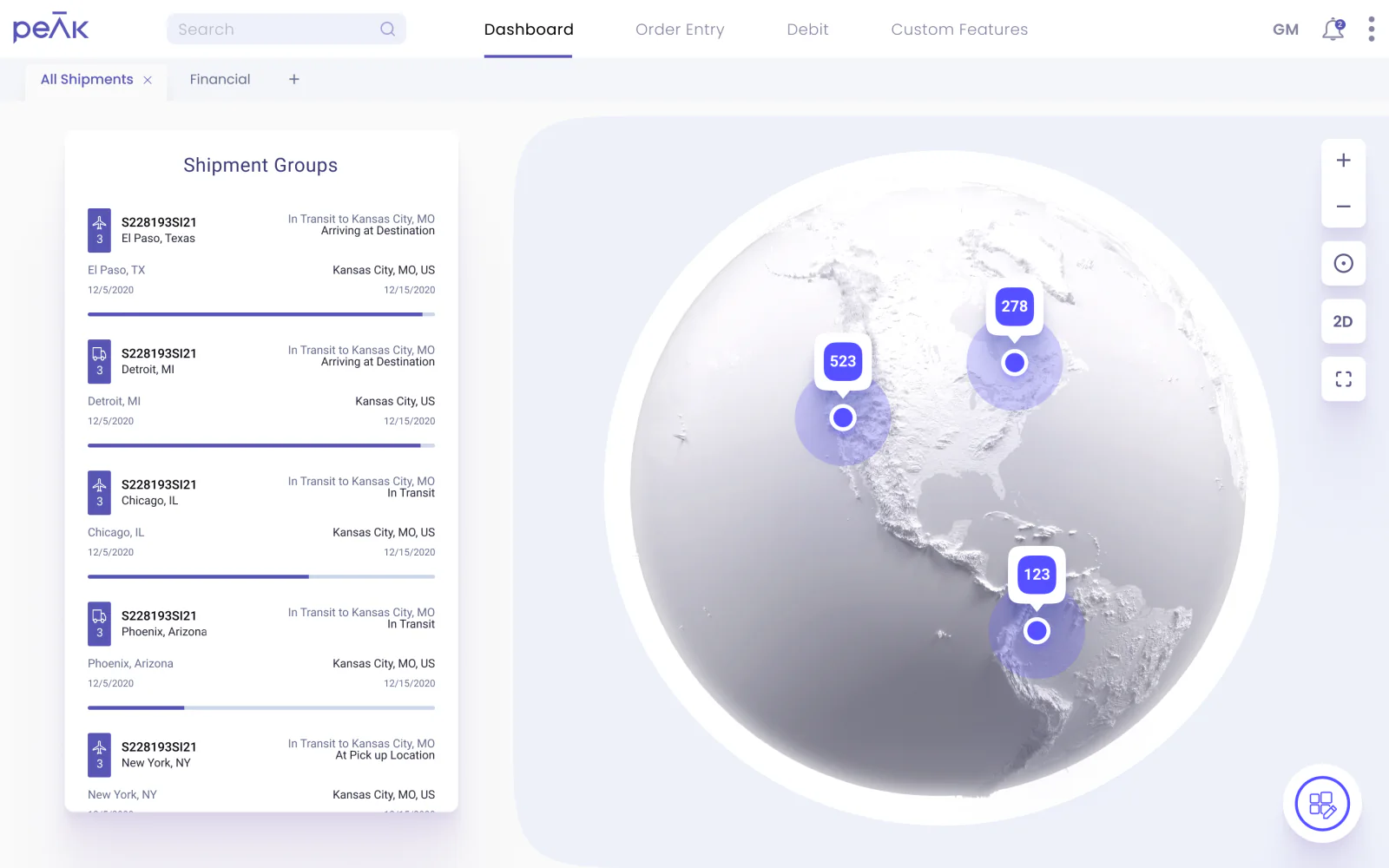
The PEAK dashboard: Shipment Groups beside a 3D globe of shipment clusters

Map view

Where every shipment is, grouped into clusters by area. Spin the globe or flatten it to a 2D map, click into a region, then take the map full screen and open a cluster for its shipments.

  1. 01Spin the globe, or flatten it to 2D
  2. 02Click a cluster to zoom into its region
  3. 03Take the map full screen
  4. 04Open a cluster’s shipments
The PEAK dashboard before edit mode: Shipment Groups and the map

Edit mode

Edit mode opens a drawer holding every widget. Take off the ones you don’t use, add the ones you do, and save. Each customer ends up with a dashboard built around their role.

  1. 01Edit mode opens the widget drawer
  2. 02Take widgets off the board
  3. 03Add the ones you need
  4. 04Save, and it’s a dashboard of its own
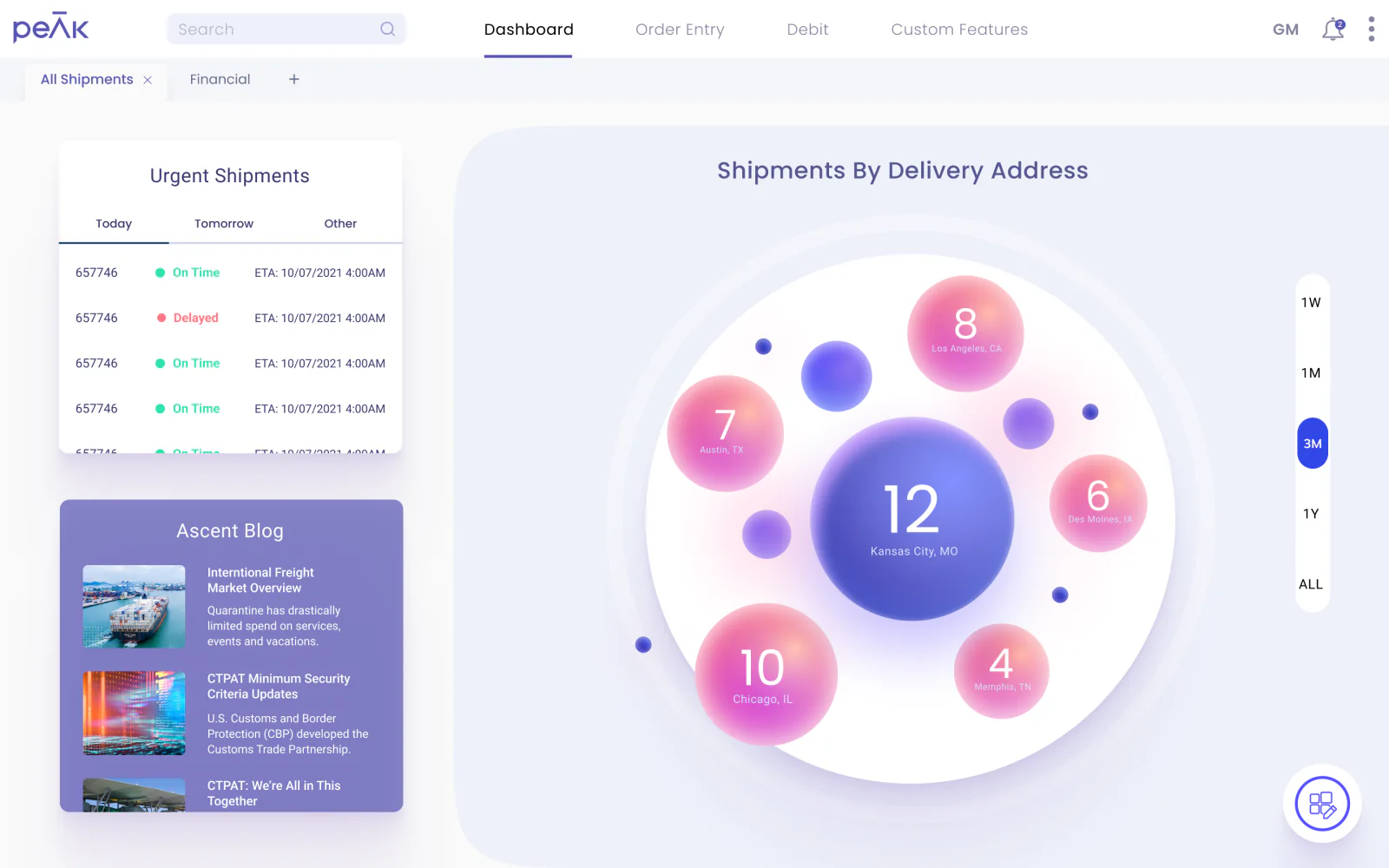
Incoming Shipments: a bubble for each destination, sized by how many shipments are headed there

Incoming shipments

Each destination is a bubble sized by the shipments headed its way. Open one and its delivery addresses turn in beside it; close it to get back to the whole picture.

  1. 01Every destination, sized by its shipments
  2. 02Open one for its addresses
  3. 03Close it to see them all
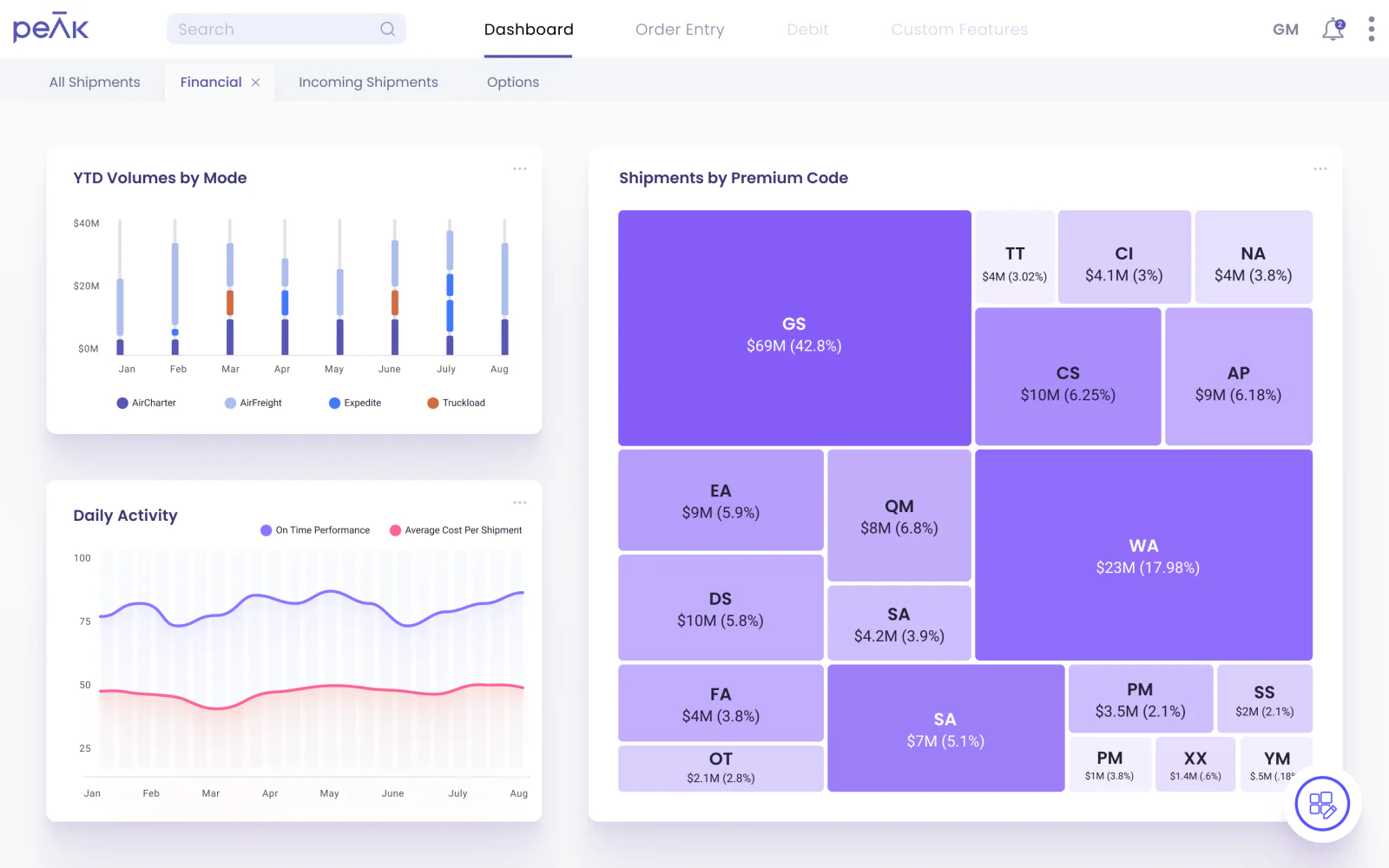
The financial view: volumes by mode, daily activity and a tree map of spend by premium code

Financial view

Year-to-date volumes by mode, on-time performance against the average cost per shipment, and a tree map that sizes every premium code by what it costs. The prototype’s charts were static, so I added hover states: a month’s mix of modes, and both values for any day.

  1. 01Hover a month for its mix of modes
  2. 02Follow on-time against cost, day by day
  3. 03Open a premium code for its detail
The PEAK dashboard, with its tabs along the top

Dashboard tabs

Tabs hold as many dashboards as a customer needs. Open a new one, browse the saved layouts as a grid or a list, or start from scratch: name it and drag widgets onto it.

  1. 01Open a new tab
  2. 02See them as a grid or a list
  3. 03Start a dashboard and name it
  4. 04Drag widgets onto it

Findings & conclusion

06Outcome

The dashboard shipped, and it’s still growing. Getting there meant making the case for research and bringing developers onto a design system.

Challenge 01

Research on a tight timeline

Problem
Ascent rarely ran user research. PEAK had been designed and built by developers from business requirements, with no design thinking, and they were attached to their software.
What we did
A brand-new feature needed real data, so we argued for research and built a research and discovery phase into the timeline.
Result
Research guided the design decisions through the dashboard’s whole lifecycle.

Challenge 02

Rolling out the design system

Problem
A new component library meant a new way of working for the front-end developers.
What we did
I implemented it in Storybook with them, then ran workshops on using the components properly and where to pull them from.
Result
After a learning curve, development became increasingly efficient.

Where it landed

  1. 01

    Still growing

    The dashboard has been through many changes and still gets new widgets today.

  2. 02

    Data-driven

    Data decided which widgets users needed most, and how to show it in small, digestible pieces.

  3. 03

    A sales tool

    It became a primary tool for the sales team when pitching potential customers.

  4. 04

    Made personal

    Users get a fresh, personalized and customizable view of their day-to-day work in PEAK.